
Form W-9 - What Is It and How Is It Used?


Form W-9 is a commonly used IRS form for providing necessary information to a person or company that will be making payments to another person or company. One of the most common situations is when someone works as an independent contractor for a business. When you are hired as a contractor for a business or beginning work as a freelancer, you may be asked to complete a W-9 and provide it to the business that will be paying you.

Key Takeaways
- Form W-9 provides personal identifiable information to a person or business used for reporting income paid to individuals such as self-employed people like independent contractors, freelancers, vendors or other customers.
- There are a variety of incomes reported on a 1099 form, including independent contractor income and payments like gambling winnings, rents or royalties, gains and losses in brokerage accounts, dividend and interest payments, and more.
- The person or business you do business with uses the W-9 to collect some of your personal information like your name, address and taxpayer identification number (Social Security numbers for individuals and employer identification numbers, or EINs, for businesses).
- You will usually submit a W-9 when you engage in most taxable transactions that need reporting to the IRS.
What is IRS Form W-9?
Form W-9 is a commonly used IRS form. If you do business with a company that pays you as an independent contractor, freelancer or gig worker (in other words, self-employed), or will be paid income such as interest or dividends, a company may request that you fill out and send a W-9 so they can accurately prepare a 1099 form, report the payments they make to you at the end of the year and know whether or not you are subject to backup withholding. And, if you hire independent contractors in your business you likely should ask for completed W-9 forms from these people.
Who Asks for a Completed W-9?
The person or business paying you is responsible for requesting the W-9 Form from you. However, the requester has no obligation to file the W-9 with the IRS. That person keeps the form on file and uses this information to prepare other returns, such as 1099 Forms and 1098 Forms, as well as to determine whether federal tax withholding is necessary on the payments you receive.
Who Needs to Complete Form W-9?
You will usually submit a W-9 form when you engage with a company where reporting information to the IRS might be necessary, such as receiving payments for services you provide as an independent contractor, paying interest on your mortgage or even contributing money to your IRA account.
The individual or business you are doing business with uses the W-9 to collect some of your personal information, the most important of which is your taxpayer identification number (TIN).
When Should You Ask for a W-9?
When you begin working with a contractor or freelancer that you will be paying, you should request that the contractor complete a Form W-9 prior to starting any engagement. Failing to do so could prove troublesome after beginning the work.
Therefore, before starting any work with a person or business, be sure to ask for a Form W-9 if they haven’t already provided you with one. Failing to do so could make you required to pay withholding taxes on the money that you pay them.
TurboTax Tip:
Companies who engage you as a contractor or make payments to you for services you provide will likely ask for a completed W-9. Likewise, banks, brokerage firms and other payers typically ask for a completed W-9 to prepare your 1099s to report items such as interest, dividends, cancellation of debt and more.
What is backup withholding?
Backup withholding is money sent to the IRS from income payments which otherwise wouldn’t be subject to withholding. Payers may be required to withhold taxes to ensure that the IRS will receive income taxes that are owed to them.
Taxpayers may be subject to backup withholding when failing to supply a correct taxpayer identification number (TIN) or if the IRS believes that they owe them money and they aren’t able to collect it any other way. Further, individuals or businesses can become subject to backup withholding for failing to report interest, dividend or patronage dividend income.
Specifically, you may be subject to backup withholding and the payer must withhold at a flat 24% rate for 2023 and 2024 when:
- You fail to supply your TIN or provide an incorrect TIN
- The IRS notifies the payer to withhold taxes because you have a history of underreporting your income on your tax return (the IRS typically will only do this after it has mailed you four notices over at least a 120-day period)
- You fail to certify that you’re not subject to backup withholding
You can usually prevent backup withholding by supplying the correct information when requested and paying an appropriate amount of taxes each year. If you receive a 1099 form stating you’ve had taxes withheld through backup withholding, be sure to report this as federal income tax withheld on your income tax return.
Form W-9 Form vs. Form W-4
When beginning to work as either an independent contractor or an employee, you should expect to fill out some paperwork providing your personal identifiable information.
As an independent contractor, vendor, freelancer or other individual receiving nonemployee compensation, you typically do not work for the person or business as an employee. If you don’t work as an employee, you’ll typically have your earnings reported on a Form 1099-NEC and will need to prepare a W-9.
Form W-9 will have your personal identifiable information and states whether you’re subject to backup withholding. Unless you are subject to backup withholding, this individual or business will not withhold taxes on your behalf.
In contrast, if you are an employee, you’ll complete Form W-4 to let your employer know how much money you wish to have withheld from your paycheck for federal income taxes.
Completing Form W-9
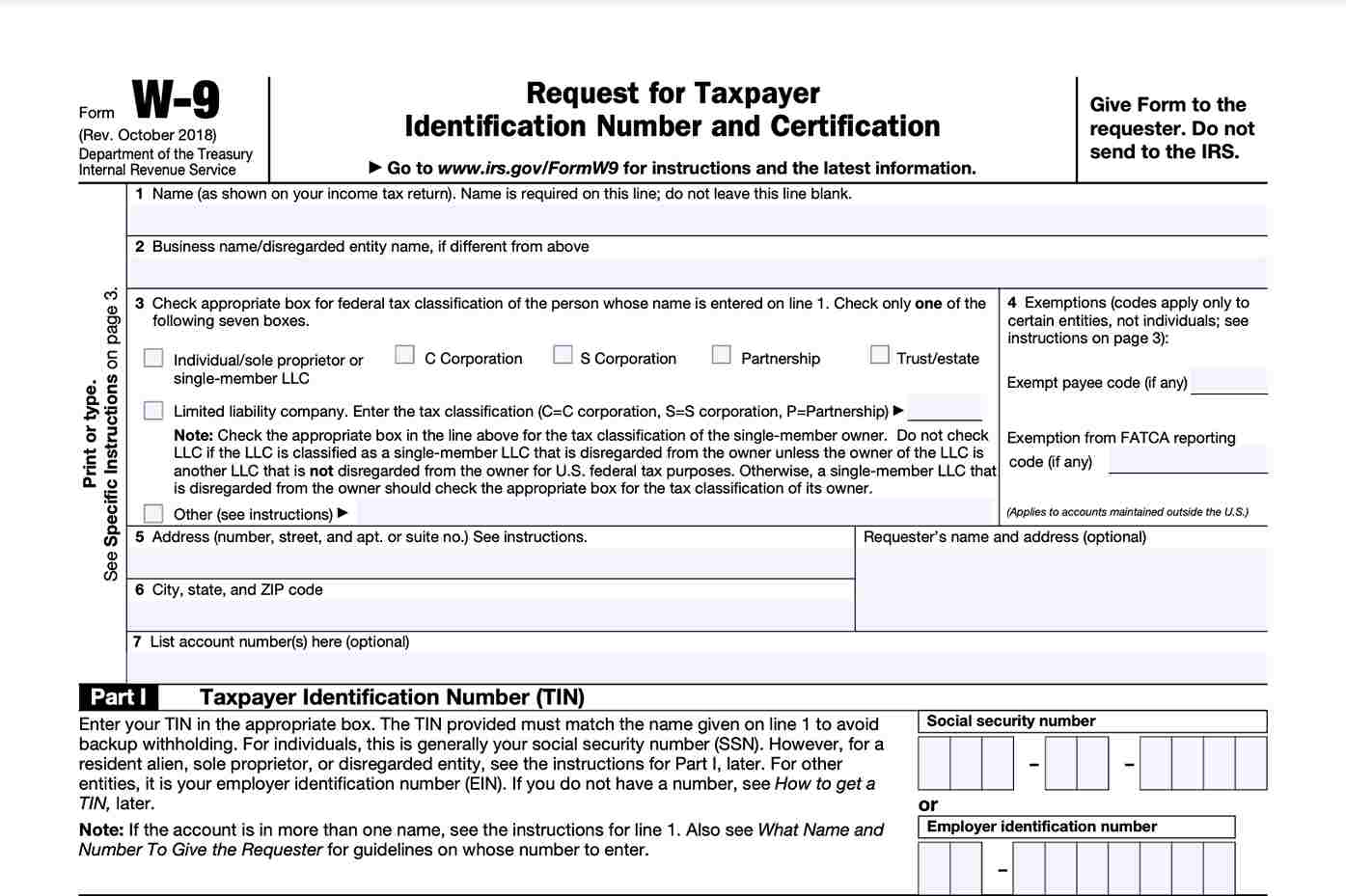
You can download the W-9 form from the IRS website. To complete Form W-9, you’ll need to provide information for the following lines and parts:
Line 1 - Name
If submitting this W-9 as an individual, you should enter the name shown on your tax return. If you have changed your last name without informing the Social Security Administration (SSA), enter your first name, the last name as shown on your Social Security card and your new last name.
If you’ve applied for an individual taxpayer identification number (ITIN), enter your name as you entered it on your Form W-7 application, line 1a. This should also match with the name entered on Form 1040.
If entering as a sole proprietor or single-member LLC, enter your individual name as shown on your 1040/1040A/1040EZ. You can enter your business, trade or “doing business as” (DBA) on line 2.
If completing the form as a Partnership, multiple-member LLC, C Corporation or S Corporation, enter the name on line 1 as shown on the corresponding tax return as well as the business, trade or DBA name on line 2.
Line 2 - Business Name
If completing your W-9 as a business, use this line to provide the information.
Line 3 - Federal Tax Classification
Depending on your circumstance, select the most appropriate federal tax classification on line 3 for the name entered on line 1. Check only one box on line 3 of the W-9.
Several types of individuals and businesses can fill out Form W-9. These are the options for which box you should check on line 3.
| Individual or Business Type | |
| If the person or business listed on Line 1 is a corporation | Corporation |
| If an individual, sole proprietorship, or single-member LLC owned by an individual and disregarded for federal tax purposes | Individual/sole proprietor or single-member LLC |
| If an LLC treated as a partnership, disregarded entity separate from its owner and owned by another LLC not disregarded for federal tax purposes | Limited liability company and enter the appropriate tax classification (P=Partnership; C=C Corporation; or S=S Corporation) |
| If a partnership | Partnership |
| If a trust/estate | Trust/estate |
Line 4 - Exemptions
If you complete Form W-9 as an individual, you don’t need to worry about filling out this section.
Certain businesses and organizations are exempt from backup withholding in certain instances and will need to fill out this line. Should any of these apply to your situation, you’ll need to provide a number or letter code from the instructions representing the reasons behind making this declaration. In most cases, corporations and businesses will be exempt from backup withholding.
The Foreign Account Tax Compliance Act (FACTA) appears on the second prompt of the Exemptions line. Foreign financial institutions are generally required to report payments to, and withhold taxes from payments to their customers that are United States persons. However, certain payees are exempt from this and will need to enter the applicable code from the Form W-9 instructions to assert their exemption.
Lines 5 and 6 - Address, city, state and ZIP Code
This will be the address where the person or business will mail you your 1099. The address, city, state and ZIP code will go into Lines 5 and 6.
Line 7 - Account number(s)
Use Line 7 if you need to supply the person or business paying you with account information such as a bank or brokerage account that pertains to the request for the W-9.
Part I - TIN
In this section, you will provide your taxpayer identification number (TIN). As an individual or single-member LLC, this will usually be your Social Security Number. It can also include your employer identification number (EIN) if you are a multi-member LLC classified as a partnership, C Corporation or S Corporation.
If you operate as a sole proprietor, you may include either number.
In the event you live in the United States as a resident alien and thus are ineligible for a SSN, you can use your IRS ITIN.
Part II - Certification
You sign and date the form in this field, declaring the information you have provided is accurate to the best of your knowledge. You will need to cross out Item 2 of the certification if you are subject to backup withholding for failing to to report all interest and dividends on your tax return.
Your certification states that you are a U.S. citizen, other U.S. person or resident alien. If you are preparing your W-9 as a joint account, only the person whose TIN shows in Part I should sign.
Using Form W-9
At the end of the tax year, the information contained on the completed Form W-9 gets used to prepare 1099 forms like 1099-NEC, 1099-MISC, 1099-INT, and 1099-DIV. Making sure that Form W-9 is completed accurately can save a lot of trouble come tax time.
To understand more about tax deductions, visit our Self-Employed Tax Deduction Calculator for Contractors.
Let a local tax expert matched to your unique situation get your taxes done 100% right with TurboTax Live Full Service. Your expert will uncover industry-specific deductions for more tax breaks and file your taxes for you. Backed by our Full Service Guarantee.
You can also file taxes on your own with TurboTax Premium. We’ll search over 500 deductions and credits so you don’t miss a thing.














