
What is a W-2 Form?


A W-2 tax form shows important information about the income you’ve earned from your employer, amount of taxes withheld from your paycheck, benefits provided and other information for the year. You use this form to file your federal and state taxes.

|
Key Takeaways • Form W-2 provides important tax information from your employer related to earnings, tax withholding, benefits and more • Your Form W-2 should be sent by January 31st of each year and be used to prepare your tax return • The IRS uses W-2s to track employment income you’ve earned during the prior year |
What is Form W-2?
The IRS requires employers to report wage and salary information for employees using Form W-2. Your W-2 also reports important details about the amount of federal, state and other taxes withheld from your paycheck as well as other employer fringe benefits like health insurance, adoption and dependent care assistance, health savings account contributions and more. As an employee, the information on your W-2 is extremely important when preparing your tax return.
In general, if you worked as an employee in a given year, you should receive a W-2 from your employer near the beginning of the following year.
When are W-2s due in 2023?
To ensure you have it in time, the IRS requires your employer to send you a W-2 no later than January 31st following the close of the calendar year. Generally, this means W-2s are mailed by January 31st, but not necessarily received by employees by this date.
As an employer, you must file W-2 forms with the Social Security Administration (SSA) and the IRS by January 31st but may file for a 30-day extension by submitting Form 8809, Application for Extension of Time to File Information Returns. You will need to indicate that at least one of the criteria for granting an extension applies.
Even if you request and receive an extension to file W-2s, you must still provide your employees copies of their W-2s by January 31st unless you also apply for an extension to provide W-2s to your employees after the due date.
You can request an extension of 15 days to provide W-2s to your employees unless you show a need for a 30-day extension by faxing a letter to the IRS.
What to do if you haven’t received your W-2
If you haven’t received your W-2 by early February, contact your employer. They might be able to provide you with an electronic version for use until you receive the paper version in the mail.
TurboTax Tip: You can also use online tax software like TurboTax to import your W-2 even if you haven’t received it in the mail yet.
What to do if you find an error on your W-2
If you receive your W-2 and notice an error on your form, whether your name is misspelled, has an incorrect social security number, wrong dollar amount, or some other issue, let your employer know and ask for a corrected W-2.
Who receives a Form W-2?
You should only receive a W-2 if you are an employee.
TurboTax Tip: If you are an independent contractor or work for yourself, the work you do may be similar to what an employee does, but you should receive an earnings statement on a Form 1099-NEC rather than a W-2.
You may receive multiple W-2s if you:
- changed jobs within the calendar year, or
- work more than one job where you’re considered an employee, or
- the company you worked for was acquired by another company
How do you use a W-2?
Form W-2 is completed by an employer and contains important information that you need to complete your tax return. It reports your total wages for the year and the amount of federal, state, and other taxes withheld from your paycheck. It may also contain information about:
- Tips
- Contributions to a 401(k)
- Contributions to a health savings account
- Premiums your employer pays for health coverage
- A variety of other information
How to read Form W-2
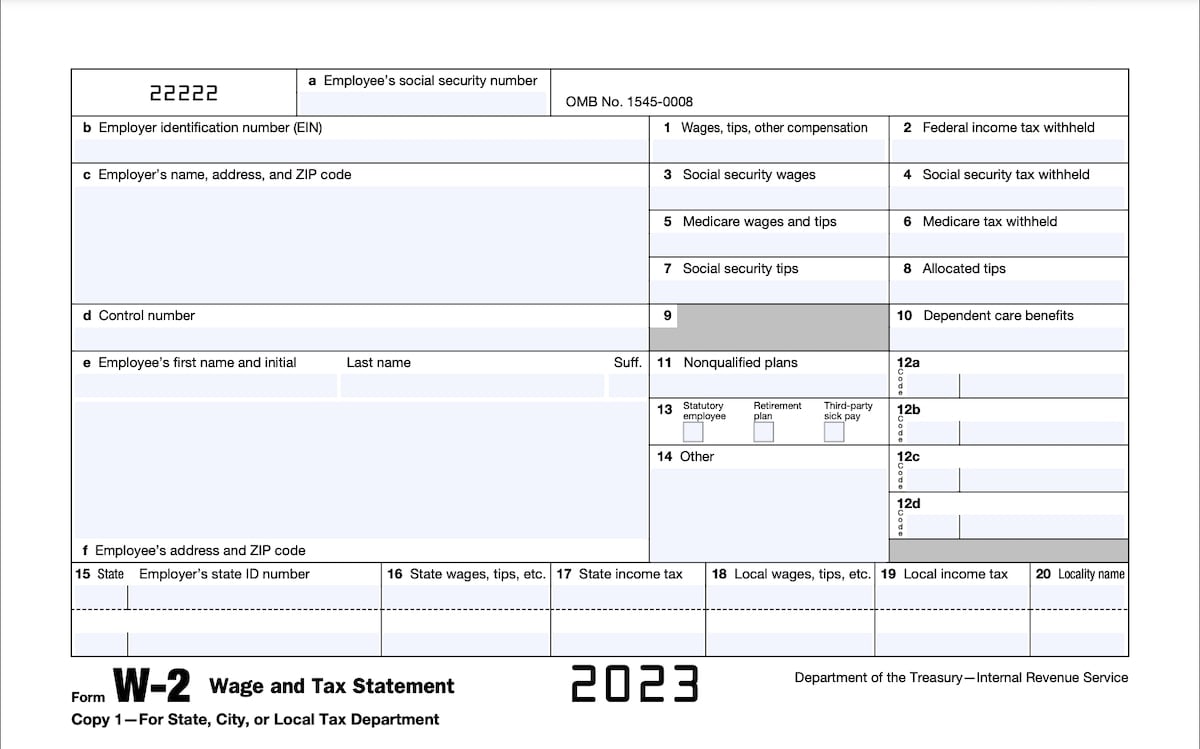
Boxes A-F
These boxes on the W-2 provide all the identifying information related to you and your employer. You’ll see your social security number (Box A), name (Box E) and address (Box F) appear here, while your employer’s employer identification number (EIN) (Box B), name and address (Box C) and control number (Box D), if any, appear here as well.
Boxes 1 and 2
Box 1 shows your total taxable income paid by your employer including any wages, salary, tips, bonuses and other taxable compensation. Box 2 shows the total amount of federal income tax withheld by your employer on your behalf.
Boxes 3-6
Boxes 3 and 5 show the amount of your earnings subject to Social Security and Medicare taxes, respectively. Boxes 4 and 6 show the amount of Social Security and Medicare taxes withheld. The amounts in boxes 3 and 5 might be different from the amount in box 1. This often happens in situations where you defer income as with contributing to a 401(k) or other similar plan.
Boxes 7 and 8
If you earned money through tips, Box 7 shows how much has been reported in tips while Box 8 shows how much money your employer allocated to you in tips.
Box 9
The box once reported an employer benefit which no longer exists. The box is grayed out as a result.
Box 10
If your employer provided or paid for dependent care benefits, Box 10 reports this amount.
Box 11
If you received certain deferred compensation income from your employer from a non-qualified plan, this information is reported in Box 11.
Box 12
If you received other types of compensation or reductions to your taxable income, these will be reported in the Box 12 series. You will have a single or double letter code corresponding to each, including items such as contributions made to a 401(k) plan, health savings account contributions made by your employer, or the taxable cost of group-term life insurance over $50,000.
Box 13
Box 13 reports whether you worked as a statutory employee not subject to federal income tax withholding, participated in an employer-sponsored retirement plan such as a 401(k) or 403(b), or received sick pay through a third-party source, like an insurance policy.
Box 14
If you have other tax information that doesn’t fit into the other W-2 Boxes, your employer may use Box 14 to report these items. Such examples include state disability insurance taxes withheld, union dues, uniform payments, health insurance premiums deducted and more.
Boxes 15-20
Your employer uses Boxes 15-20 to report state and local income tax information with the two-letter abbreviation for the name of your state alongside your employer’s state ID number assigned by the state. These boxes can report wages for two states and two localities.
If your employer needs to report information for more than two states or localities, they need to prepare a second Form W-2 for you to use.
What is the difference between a 1099 and W-2?
Both the Form W-2 and Form 1099 are meant to report income you earned from sources throughout the tax year. Where they differ are the circumstances under which you receive them and the taxes withheld from the income.
When you work as an employee, your employer should send you a W-2. If you work as an independent contractor, the company will likely send you Form 1099-NEC rather than a W-2.
The difference between a 1099 and W-2 primarily comes down to the tax withholdings. Employers (W-2) withhold money from your pay and send it to the various tax agencies throughout the tax year on your behalf.
As a self-employed person (1099), the business paying you doesn’t usually withhold money on your behalf. You are responsible for making your own payments for the taxes that you owe each year.
What is the difference between a W-4 form and W-2 form?
While similar in name, there are big differences between a W-4 form and W-2 form.
First, who prepares each form differs. If you work as an employee, you prepare a W-4 form and submit it to your employer. Your employer prepares a W-2 at the end of the year and submits it to you as well as the IRS and the Social Security Administration.
Second, the W-4 provides information to your employer that determines how much tax to withhold from your paycheck. The W-2 reports how much you earned from your employer as well as how much tax was withheld on your behalf during the tax year.
You should consider reviewing your tax withholding annually to ensure you withhold the correct amount of money from your paychecks. If you receive a large refund each year and would rather have a bigger paycheck each pay period and smaller refund at tax time, you can use the W-4 to instruct your employer to change your withholding.
Likewise, if you underpaid your taxes and owed a balance to the IRS, you can provide a new W-4 to your employer so they will withhold more from each paycheck. This can help you avoid having to make a tax payment with your tax return and can reduce or eliminate penalties for underpayment of your estimated tax.
To get a better sense of how much you might need to withhold, use TurboTax’s W-4 withholding calculator.
What is “Cafe 125” on a W-2 tax form?
Not to be confused for a place to go for coffee, Cafe 125 stands for IRS regulation code section 125 regarding tax-free cafeteria plans. Employers can choose to set up “cafeteria” plans for a variety of reasons, such as pre-tax income for certain benefits like:
- 401k plans
- group term life insurance policies
- adoption assistance
- dependent care assistance
- health insurance
- health savings accounts (HSAs)
- flexible spending accounts (FSAs)
You, your spouse or dependents can be eligible for these plans if you meet specific requirements set by your employer.
When you have Cafe 125 reported on your W-2, this should not change how you prepare your tax return. The money set aside for selections you made in your work’s cafeteria benefits plan should already be subtracted from the total amount of your wages reported in box 1 of your W-2.
What is Form W-2G?
If you gambled and received winnings, they typically need to be included in taxable income. The casino or other gambling operator may provide you a Form W-2G immediately at the gambling venue or by the end of January that you will use to prepare your tax return.
This form provides reportable winnings. You might not necessarily receive a W-2G for all of your gambling winnings, but you still need to report all of them. If you receive multiple W-2G forms, you must enter the winnings from each of them when preparing your tax return.
Importance of your tax withholding
When your employer withholds amounts from your paycheck for income taxes, those amounts are remitted to the IRS and other taxing authorities throughout the year. You may not realize it, but in most cases, you cannot wait until the filing deadline to pay your entire tax bill. These taxing authorities require everyone to make periodic payments throughout the year; however, your employer takes care of this for you based on the information from your Form W-4.
When you prepare your returns and calculate your tax for the year, the withholding amount your employer reports on the W-2 is subtracted from your tax bill.
Verifying your name and Social Security number
The identifying information section of the W-2 is essentially a tracking feature. If the income you report on your taxes does not match the information on all of your W-2s, the IRS will want to know why. Similarly, the IRS will match the reported payment amounts with your employer's corporate tax reporting for accuracy.
But most importantly, since the IRS receives a copy of your W-2s, it already knows that you likely have reportable income and may contact you if you fail to file a tax return. If the name or Social Security number on your W-2 is inaccurate, you should immediately report this to your employer to correct.
Attaching your W-2
When you finish your tax returns and get ready to file them, remember that you need to include a copy of your W-2s. If you e-file using TurboTax then your W-2 information is sent along electronically with your tax return. However, if you are filing your tax return by mail then you need to attach a copy on the front of your return.
With TurboTax Live Full Service, a local expert matched to your unique situation will do your taxes for you start to finish. Or, get unlimited help and advice from tax experts while you do your taxes with TurboTax Live Assisted.
And if you want to file your own taxes, you can still feel confident you'll do them right with TurboTax as we guide you step by step. No matter which way you file, we guarantee 100% accuracy and your maximum refund.


















